Orders in, batches made, units serialised, parcels shipped, money counted — one Postgres database, one permission model, one event log. This page walks the sidebar of the real app, group by group.
Pharmacy Flow is a single web application, not a suite of products that share a logo. Every screen reads and writes the same tenant-scoped tables, every status change is enforced by a Postgres trigger, and every action lands in one event log. Below is the app's own navigation, in the order the business flows: orders in, make, fulfil, quality, money, settings. Each module is described by what it does, not what it aspires to.
Home: the dashboard, task inbox and approvals
The Home group is where a shift starts. The Dashboard is built from SQL views over the whole tenant: order status counts, open work-in-progress and its age, on-time delivery from parcel scans, and the anomaly scan's headline items. The Task Inbox lists what needs a human decision, and Approvals is the electronic-signature queue: a signature is bound to the signed-in identity and only applies after a fresh password re-authentication, then it is written to an approvals table and the event log with the meaning chosen (reviewed, approved, and so on). Notifications is the outbound record of every email, SMS and in-app message the system queued for partners, patients and staff.
The dashboard: status counts, WIP age, on-time delivery and the anomaly scan, all from tenant-wide SQL views.
Orders & Patients
Orders is a SQL-paged workbench: filter by status, brand, facility and period, export the list, and open any order to see its status history with the acting user on every change. Orders arrive four ways: the partner API, the partner portal's submit form, a refill of a prescription, or staff entry. Whatever the channel, the same eligibility check runs: the ship-to state must have an active nonresident-pharmacy licence on file for the tenant, and a controlled product must be allowed in that state, or the order lands in On Hold with the reason written on it.
One order model, four channels
The order lifecycle is a fixed graph in the database (Received, Eligibility, Clinical Review, In Production, Packed, Shipped, Delivered, On Hold, Cancelled). A trigger rejects any transition that is not in the graph, refuses Shipped without a recorded pack verification, and refuses Packed without a finished lot. Every change is written to a status-history table, which is what the stage-timing views read.
Prescriptions carry the Rx number, refills authorised and remaining, the prescriber and the DEA schedule of the most restrictive component; a refill of a Schedule II prescription is refused, and Schedule III–V refills are limited to five within six months of the written date. Patients, Subscriptions (recurring orders with a cadence, refill number and next-fill date, which can be paused or cancelled), Brands (each partner's rate card, API key, webhook and optional facility pin) and Customer Service (cases with category, priority and SLA hours) complete the group.
Order detail: eligibility result, routing reason, status history with actor, and the unit serial once dispensed.
Fulfil: production line, pack verify, shipping, Control Tower
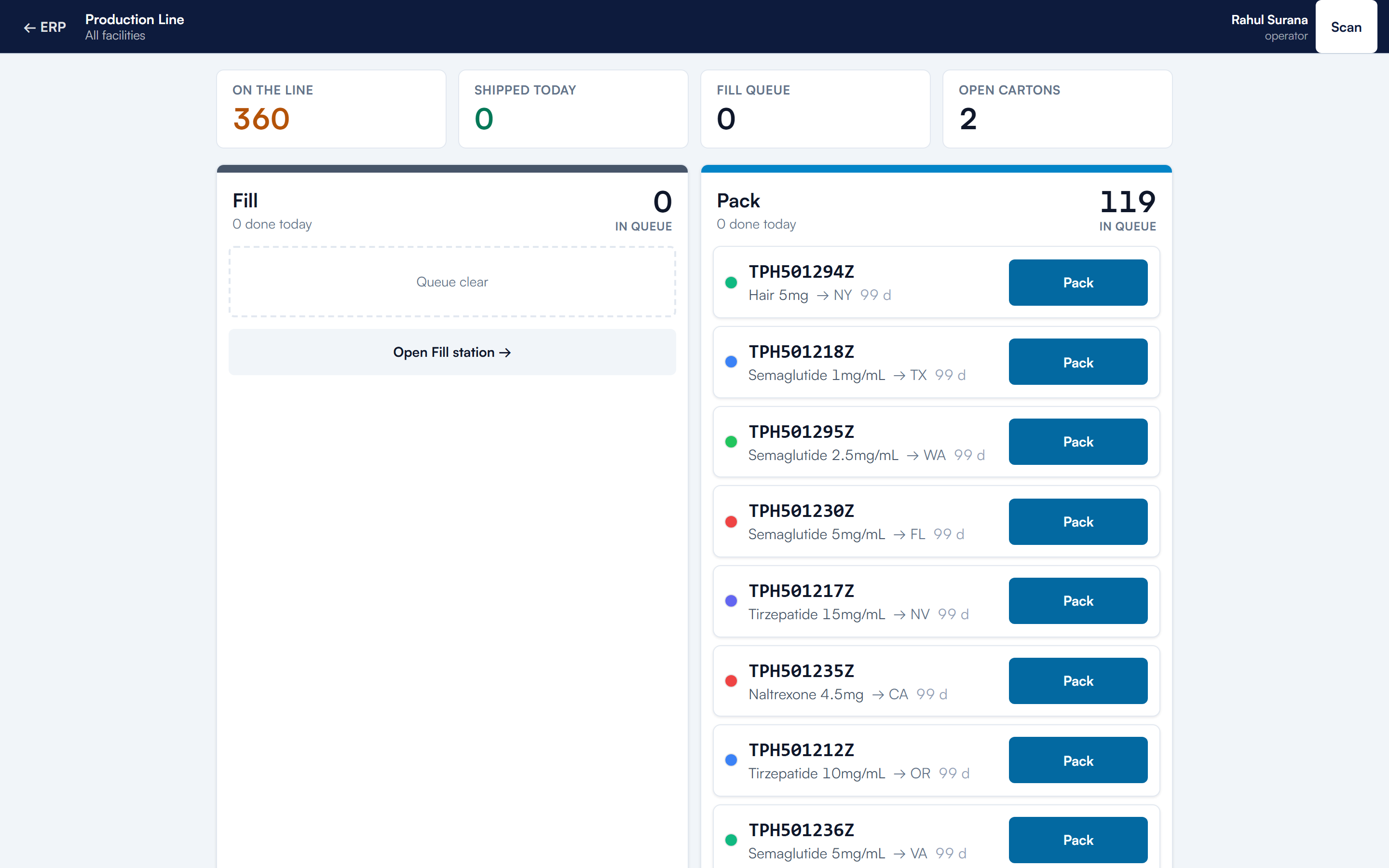
The Production Line is four scan-gated stations. Fill commissions a unit: it takes the earliest-BUD available finished lot of the order's exact variant, claims the order atomically, mints a serial, forms the SGTIN from the product's GTIN, decrements stock and prints the vial label. Pack creates the parcel and its 4×6 label, choosing a cold-chain packout and service for temperature-sensitive families. Verify is the ship interlock: the scanned serial must belong to the scanned order, be packed, not recalled and not past its BUD, or the order goes On Hold with the reason. Ship adds the parcel to the facility's open SSCC carton, writes the shipment, moves the order to Shipped and notifies the partner by webhook and the patient by SMS. Cartons close onto pallets, and pallets are manifested. Every station writes an EPCIS-style event (what, when, where, why).
The line: Fill → Pack → Verify → Ship. Each station is a scan and a state transition with an EPCIS event behind it.
Dispensing and Pack Verify are the same commissioning and verification steps outside the line layout. Shipping & Logistics lists parcels with carrier scans (deduplicated by the carrier's event id), temperature readings against the 2–8 °C window for cold-chain parcels, and QA holds: an out-of-range reading opens a hold that blocks delivery until a QA user releases it with a disposition. Returns & RMA and Label Printing (a print-job ledger with reprint and void, so labels reconcile to serials) round out the group. The Control Tower is the warehouse execution layer: waves, tasks and resources, described on the WMS & Control Tower and fulfilment automation pages.
Inventory & Sourcing
Lots, locations, transactions, transfers
Lots are the unit of inventory: internal lot id, supplier lot, quantity remaining, expiry with a computed expiry band, controlled and hazardous flags, storage condition and location. A lot's status (Quarantine, Available, Consumed, Quarantined again, Scrapped) is enforced by its own state machine. Transactions is the ledger: receipt, putaway, issue, pick, adjustment, count. Inter-site Transfers move a lot between facilities in three steps (request, approve and ship, receive and count) and book any discrepancy.
Purchase Orders and Receiving bring material in: a received line becomes a quarantined lot with supplier lot number, expiry, temperature-check result and certificate-of-analysis reference, gets an LPN and a GS1 DataMatrix label, and waits in QA & Putaway, where release is a permission-gated action and a rule engine suggests the destination bin from hazard, control status and storage class. Demand & Planning is the forecast, covered on the inventory page. Suppliers carry status and on-time performance.
Make: formulations, batches, cost and margin
A Formulation is the master record: family, form, bill of materials, standard batch size, labour minutes, QA minutes and a beyond-use-date rule. It goes through submit, approve and retire. Its variants are the strengths and fill volumes actually sold, each with a SKU; the partner API and every order reference a variant, never a free-text product.
Batch planner: choose a variant and quantity, see the BOM explosion, FEFO lot draw and projected per-unit cost before committing.
Batches creates a batch in one database transaction: the finished lot is inserted in Quarantine awaiting QC, raw lots are consumed first-expiry-first-out with the quantity taken from each recorded in a consumption table, the batch is marked In Process, and the BUD is set to the earlier of the formulation's rule and the soonest expiry among the lots consumed. QC tests are created pending with the batch; recording results and releasing or rejecting the lot are separate, permission-gated actions. Cost & Margin computes the cost of a fill from material draw and labour rates and compares it with the blended contracted rate per family, so negative-margin variants are visible. Full detail on the compounding software page.
Batches: In Process until QC releases the finished lot; the consumed raw lots and their quantities are on the record.
Quality: QMS, recalls and unit trace
A quality system that is part of the record
The Quality Dashboard rolls up Deviations, CAPA and Change Control, each with its own advance and reject actions and event trail. Env Monitoring records room, ISO class, metric, value and limit; a reading above its limit is graded Action, one within ten percent of the limit Alert. QC Testing holds the results for each finished lot. Document Control keeps controlled documents with versions.
Recalls starts from a finished lot: the system traces every dispensed unit of that lot with its brand, patient reference, state and parcel tracking, creates a numbered recall record with classification and reason, flags the units recalled (so they fail pack-verify from that moment), emails each affected partner and fires a recall.initiated webhook. Each unit's disposition is then tracked to closure. Trace & Recall and Unit Trace read the same serial and EPCIS records forward and backward.
Finance & Insights
Financial Dashboard, Income Statement, Receivables and Payables are computed from orders, rate cards, supplier invoices and payments recorded in the app; supplier invoices are created, approved, disputed and paid as tracked actions. Weekly Review and Investor Metrics present the same numbers as a weekly business review and as MRR, retention and quick-ratio views. AI Insights runs a rules engine over SQL aggregates (negative-margin fills, lots expiring within thirty days, expired stock still Available, materials below reorder point, forecast shortfalls, orders on hold by state, low-yield batches, licences expiring, weak supplier on-time rates, ageing quarantine) and, when configured, asks Claude for a short written briefing from a numeric snapshot, cached per tenant for an hour. Product, Geographic, Growth & Retention and Inventory Trends analytics sit alongside.
Analytics: product, geography, growth and inventory trend views computed from the same tenant data.
Walk the app on your own workflow
A demo is a working tenant, not a deck. Bring one formulation, one partner and one shipping state and we will run the order end to end.
Pharmacy Flow is multi-tenant. Every table carries a tenant id, row-level security resolves the tenant from the signed-in profile, and a trigger stamps the tenant on inserts. Users & Access assigns one of eight roles (Admin, Pharmacist, QA, Technician, Buyer, Receiver, Finance, Partner) whose permissions live in a Postgres table; the Technician role cannot release QA, and the Partner role sees only its own brand. Facilities declare the product families each site compounds and its daily capacity; Order Routing uses those declarations, a brand's optional pin, the ship-to state and trailing three-day load to pick a site, and lets you reroute an order by hand. Licensing holds nonresident-pharmacy licences by state with validity dates and whether controlled substances are permitted; it is the table the eligibility gate reads. Materials, Products (with GTIN), Staff & Labor (the labour rates behind costing), Operating Costs, Onboarding, Integrations, the Event Log and the Scanner PWA complete the group. Security detail is on security & compliance.
Partner portal, marketplace and directory
The Partner Portal is a separate surface for telehealth brands and clinics: submit orders, track them, see shipments and subscriptions, browse the catalogue they are contracted for, read billing and performance, open support cases, and manage their webhook endpoint (URL, secret rotation, test ping, delivery health). It reads the same orders the pharmacy works, filtered to the partner's brand by row-level security.
The portal: a partner's own orders, shipments and subscriptions, scoped by row-level security.
The Marketplace has a buy side (browse a supplier directory of US pharmacies and FDA-listed manufacturers, request quotes, post RFQs, track orders) and a sell side (storefront, listings with controlled-substance flags, RFQ inbox, enquiries). Only a claimed and verified seller can submit a quote; that rule is a database trigger, not a button state. Read more on partners.
Is Pharmacy Flow one application or several products?+
One Next.js application over one Postgres database. Every module in the sidebar reads and writes the same tenant-scoped tables, and the partner portal and platform console are additional surfaces on that same database, not separate systems.
How is an order's lifecycle enforced?+
By a database trigger. The allowed transitions are rows in a table; any update that is not in the graph is rejected. Shipping requires a recorded pack verification and Packed requires a finished lot. Each change is written to a history table with the acting user.
What does the AI layer actually do?+
Two things. A deterministic rules engine scans SQL aggregates for inventory, financial, compliance, production, supplier and fulfilment anomalies and links each to the records involved. When an Anthropic key is configured, a short executive briefing is generated from a numeric snapshot and cached per tenant for an hour; without a key, a deterministic narrative is shown instead.
Does it support more than one facility?+
Yes. Facilities declare the product families they compound and a daily capacity. Routing picks a site by capability, brand pin, ship-to state, then lowest load. Lots belong to a facility and move between sites through an approve-and-receive transfer.
Which roles exist and where are permissions stored?+
Admin, Pharmacist, QA, Technician, Buyer, Receiver, Finance and Partner. The role-to-permission map is a Postgres table and every server action re-checks the permission it needs before writing.
How do partners integrate?+
Through a per-brand API key on a REST endpoint, a partner portal, and HMAC-signed webhooks with an outbox that retries failed deliveries. The full request and response shapes are documented on the telehealth API page.
Is the marketplace part of the same login?+
Yes. Marketplace buy and sell groups appear in the same sidebar, gated by market.buy and market.sell permissions. The public supplier directory is readable without a login.
A working platform, not a slide deck. Book a walkthrough and we'll run a real order from intake to carrier lane — or explore the public directory first, no account needed.